


Test DPC
4.139.00 Reviews
App Specs
- Version
- 9.0.16
- Updated On
- License
- Free
- Downloads
- 500,000+
- Developer
- Google LLC
- Categories
- Libraries & Demo
- Platform
- Android
Screenshots
 Analysis by AppCompare
Before I reach for a device-policy test tool, I try to pin down what I actually need to learn: will my app still behave sensibly when Android is managed, or am I only checking its ordinary, personal-device experience? That distinction matters. Test DPC is aimed at the first question, not at general phone customization, and it makes most sense when there is a real app or managed-device workflow to check.
Start with a test goal, not a settings tour
I would begin with one concrete task, such as checking whether an app remains usable in a work profile or responds appropriately when device policies restrict it. That keeps the session focused. Test DPC is a sample device policy controller from Google LLC, in the Libraries & Demo category, so its value is as a testing aid rather than a finished management service for a workplace.
The distinction also helps set expectations: installing the app does not, by itself, tell you whether a product is enterprise-ready. The useful outcome comes from pairing a controlled policy setup with the app you want to examine, then checking the behavior that matters to your users. I would treat each change as a test condition and record what the app does before moving on.
Move through setup carefully
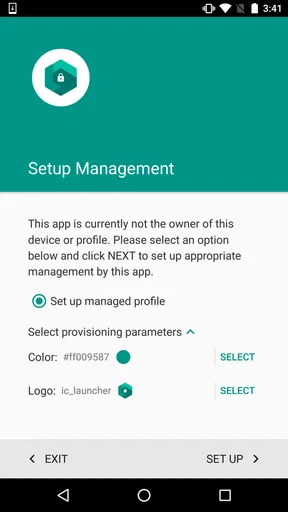
The first thing that struck me about Test DPC is its straightforward installation process. Available on both Android and iOS, it’s easy to download and get started. The app is designed primarily for developers and testers, so it’s packed with features that help simulate different Android Device Policy Controller (DPC) scenarios. Setting it up was as simple as following the on-screen prompts, and I had it running in no time.
One thing I appreciated right off the bat is the uncluttered interface. It’s functional and to the point, which is exactly what you need when you’re knee-deep in app testing. There’s no unnecessary fluff, just a clean setup that lets you focus on what you’re there to do.
For a more useful test, I would avoid changing several policy settings at once. Apply one condition, open the target app, and note what changes; then reset or adjust the test before trying the next condition. That simple discipline makes it easier to tell whether a problem comes from a restriction, the app’s own behavior, or an unrelated device setting. It is a practical way to turn a sample controller into a repeatable test workflow rather than a collection of toggles.
From managed setup to a useful test result
I use the managed-setup stage to turn a broad compatibility question into a test I can actually evaluate. Before applying a condition, I decide which user task matters and what outcome would count as a failure; that small bit of preparation makes the next handoff easier to interpret. From there, I look at how the work context affects the target app, not just whether the setup itself appears complete.
Worth Reading Before You Choose

EA SPORTS FC Mobile 26 Is a Bigger Football Game, but It Takes Time

Flipboard Shows What News Apps Must Do Beyond the Feed

Switching to Android Auto Means Rethinking Your Driving Routine

Google Calendar Makes a Crowded Week Easier to Manage

Ludo King Makes the Most of the Minutes Between Plans

Baby Panda World Brings Quick Play to Modern Phones, but Its Game Library Feels Busy
Check the work-profile handoff
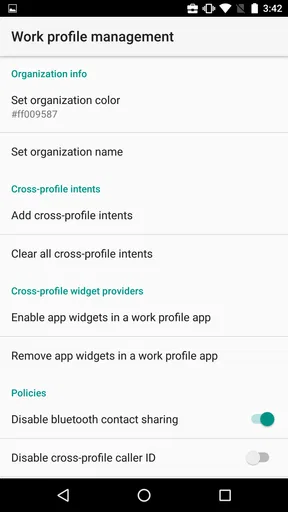
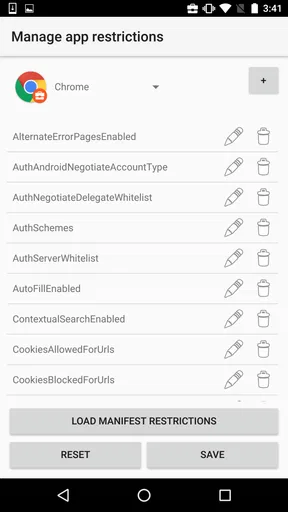
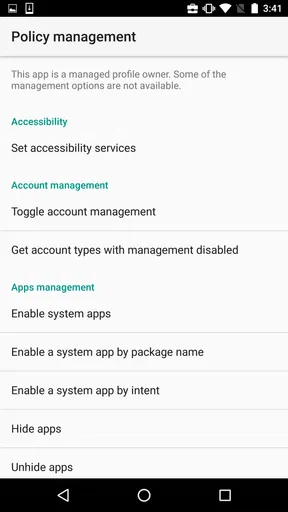
Once you’re in, the real magic happens. Test DPC offers a plethora of features that allow you to test every nook and cranny of your app. You can configure policies, set restrictions, and tweak settings to see how your app handles different environments. This is particularly useful if you’re developing apps for enterprise use, where specific policies and restrictions are a must.
The ability to create managed profiles is another standout feature. This lets you simulate work profiles, which is crucial for testing how apps behave in a corporate setting. You can also test notifications, app restrictions, and other enterprise features, making it a comprehensive tool for developers.
A realistic handoff to examine is the boundary between personal and work use. For example, a tester can check whether a work app remains understandable when opened in a managed context, and whether its notifications still make sense under the chosen test conditions. I would look at both the visible result and the user’s next step: can they tell what to do, or does a restriction leave them with a confusing dead end? That question often reveals a usability issue that a simple launch test misses.
There is a useful trade-off here. A managed profile can help reproduce a work-style situation without turning every experiment into a test of the entire device, but it is still a controlled setup. I would not assume that success in one simulated arrangement proves the app will behave identically under every organization’s management choices. The app helps expose specific cases; sound testing still depends on choosing cases that resemble the intended deployment.
Read behavior, not just whether the app opens
In terms of performance, Test DPC runs smoothly. I didn’t encounter any noticeable lag or crashes during my testing sessions, which is a huge plus when you’re dealing with complex apps. The interface is intuitive, and even if you’re not a seasoned developer, you can find your way around without much hassle.
Usability is where this app truly shines. It’s designed to be user-friendly, with clear instructions and a logical layout that makes it accessible to both beginners and experts. You can easily switch between different testing modes and configurations, which saves time and effort.
For me, the strongest test is not simply “does it open?” but “what can the user do next?” A restriction may leave a screen technically available while removing the action someone expects to take. I would check the whole short journey: open the app, reach the relevant task, encounter the managed condition, and confirm whether the app explains the limitation clearly. This is especially useful when testing workplace apps whose everyday value depends on a smooth handoff between a managed profile and a user’s normal routine.
Test DPC is free, carries an Everyone age rating, and has an average rating of 4.1 from around 1.6 thousand ratings, with over 500 thousand installs. Those figures suggest that it has found a practical audience, but they are not a substitute for deciding whether you have a device-management test to run. Its current version is 9.0.16, it was released on October 22, 2015, and it requires Android 6.0 or later. Since this is specifically an Android tool, I would choose an Android device for the workflow rather than plan around an iOS installation.
Where it fits—and where it doesn’t
Now, you might be wondering, "But how does this help me in the real world?" Well, if you’re involved in app development or testing, Test DPC is a game-changer. It allows you to ensure that your app complies with various policies and works seamlessly across different Android versions and device settings. This is crucial for delivering a polished product to your users.
Moreover, if your app is intended for enterprise use, being able to test its compatibility with managed profiles and restrictions can prevent potential issues down the line. This means less time spent troubleshooting and more time focused on enhancing user experience.
Compared with an ordinary personal-device test, the main advantage is that Test DPC gives you a way to examine managed conditions rather than merely checking the app in a standard setup. Compared with a full enterprise deployment, it is a sample controller, not a replacement for an organization’s complete management process. I would use it early in development to catch awkward policy-related behavior, then validate important cases in the actual environment the app is meant to serve.
A practical everyday example would be a developer checking a work app before a release: set up a managed-profile scenario, try the app’s core task, observe what happens when a restriction affects that task, and adjust the app’s instructions or behavior if the handoff is confusing. A support or QA teammate could use the same sequence to reproduce a reported issue, provided they have a clear test condition to follow. For someone who only wants to manage a personal phone, install everyday apps, or explore Android settings casually, this is the wrong tool; a normal settings screen or the organization’s own management solution is a better fit.
One limitation I would keep in mind is that test results are only as useful as the scenario behind them. A broad claim like “it works with management” is too vague to verify. Write down the policy condition, the app version being tested, and the user action that failed or succeeded. That makes results easier to compare between runs and gives developers a specific issue to fix. It also prevents a quick demonstration from being mistaken for a complete compatibility check.
My recommendation after the test run
All in all, Test DPC is a fantastic tool for developers and testers looking to fine-tune their apps. Its robust feature set, coupled with a user-friendly interface, makes it a must-have in your testing arsenal. Whether you’re developing for general use or enterprise environments, this app provides the insights you need to ensure your app performs at its best.
If you haven’t tried it yet, I’d highly recommend giving Test DPC a spin. It’s one of those tools that once you start using, you’ll wonder how you ever got by without it.
My recommendation is more specific: I would keep it in the toolkit when an Android app needs to be checked against managed-profile behavior, policy restrictions, or the way a work task is handed back to its user. I would skip it if I had no test target and simply wanted a friendlier way to configure a phone. The best result is not a reassuring impression after a quick launch; it is a repeatable finding that tells the app team what happens under a defined condition and what needs attention before real users meet that condition.
Pros
- Highly customizable settings.
- Open-source and free to use.
- Supports various Android versions.
- Great for testing app permissions.
- Useful for developers and IT admins.
Cons
- Not user-friendly for beginners.
- Limited support for non-developers.
- Complex setup process.
- Requires technical knowledge.
- Potential security risks if misused.
FAQs for Test DPC
What is Test DPC and what is its primary use?
Test DPC is a sample device policy controller designed for developers to test their apps in a managed context. It allows developers to simulate various scenarios and configurations for Android devices, ensuring their apps work seamlessly in managed environments, such as those using enterprise mobility management (EMM) solutions.
Is Test DPC safe to use on my device?
Yes, Test DPC is safe to use, but it is intended primarily for developers and not for everyday users. It's an essential tool for testing Android applications in a controlled environment. However, because it can change device settings, it's important to use it on a test device rather than a primary one.
Does Test DPC require any special permissions or access rights?
Yes, Test DPC requires several permissions to function correctly, such as the ability to manage device policies, control app installations, and modify system settings. These permissions allow it to simulate a managed device environment accurately. Always ensure you understand the implications of granting these permissions on your test device.
Can Test DPC be used to test any Android application?
Test DPC is designed to test applications that need to function in a managed profile or device owner mode. It's particularly useful for developers working on enterprise apps that need to comply with specific security policies or management requirements. It may not be suitable for testing regular consumer apps.
How does Test DPC affect device performance and data?
Test DPC can alter device settings and configurations to simulate a managed environment, which might impact device performance temporarily. It is recommended to use it on a secondary device. Additionally, it may result in loss of data or settings if not configured properly, so always ensure backups are in place before testing.


